
The Best Distance to Sit From a 4K TV Explained
Buying a new television used to be simple. You picked a screen size that fitted your cabinet, connected it to an aerial or satellite dish, and started watching. But modern TVs have changed the rules completely. With 4K Ultra HD televisions now becoming the standard in many homes, the distance you sit from the screen can dramatically affect how good the picture actually looks.
Many people spend hundreds or even thousands on a large new TV, only to sit too far away to notice the extra detail. Others go too large for a smaller room and find the experience overwhelming. Finding the ideal viewing distance can help you get the very best from your television, whether you watch films, sports, gaming content, or satellite TV.
In the days of standard definition television, viewers often sat much further away from the screen. Lower resolutions meant sitting too close could reveal soft images, visible pixels, and compression artefacts. HD improved things considerably, but 4K televisions changed viewing recommendations again because the pixel density is much higher.
With a 4K TV, you can sit closer without seeing individual pixels. In fact, sitting closer is often recommended because it allows you to appreciate the extra detail that 4K content offers. If you sit too far away, your expensive 4K television may look little different from an older HD set.
A commonly recommended rule for 4K TVs is to sit at roughly 1.2 times the diagonal screen size away from the television. This creates a more immersive experience while allowing your eyes to benefit from the higher resolution.
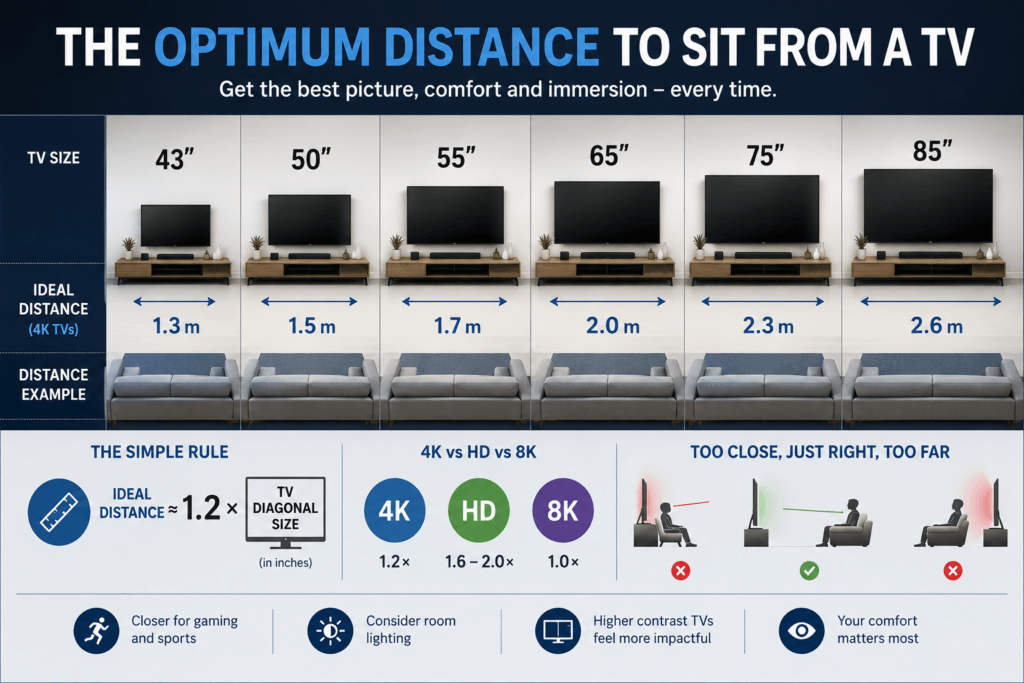
Here are some approximate viewing distances for popular TV sizes:
43-inch TV – around 1.3 metres away 50-inch TV – around 1.5 metres away 55-inch TV – around 1.7 metres away 65-inch TV – around 2.0 metres away 75-inch TV – around 2.3 metres away 85-inch TV – around 2.6 metres away
Of course, there is no single perfect answer. Your ideal viewing distance can depend on the type of content you watch. Sports fans often prefer sitting slightly closer because it increases the sense of immersion and helps follow fast-moving action. Gamers may also choose closer seating distances to improve detail and responsiveness.
However, not all television broadcasts are equal. Older standard definition channels, lower bitrate satellite broadcasts, or heavily compressed streaming content may actually look worse when viewed too closely. Artefacts and image noise can become much more noticeable on large modern screens.
The type of television panel can also affect comfort and viewing quality. OLED televisions tend to deliver deeper blacks and stronger contrast, making them feel more cinematic even at slightly closer distances. QLED and Mini LED TVs often produce much higher brightness levels, which can help in bright living rooms but may feel intense if you sit too close during darker viewing sessions.
Room layout matters too. Many living rooms were designed years ago around much smaller televisions, and modern 65-inch or 75-inch TVs can dominate the space if positioned incorrectly. Before buying a new TV, it is worth measuring both your available wall space and the distance from your sofa to the screen.
One of the biggest surprises for many people is that modern TVs are often best enjoyed larger than expected. A 65-inch TV that once seemed enormous can actually feel perfectly normal at a distance of two metres when watching native 4K content.
Ultimately, there is a balance between comfort, immersion, and picture quality. The best viewing distance is the one that feels natural for your room and viewing habits while still allowing you to enjoy the benefits of modern high-resolution displays.
As TV technology continues to evolve with 8K displays, higher refresh rates, and increasingly cinematic home entertainment systems, choosing the correct viewing distance will remain an important part of getting the best possible experience from your television.
Comments
The Best Distance to Sit From a 4K TV Explained — No Comments
HTML tags allowed in your comment: <a href="" title=""> <abbr title=""> <acronym title=""> <b> <blockquote cite=""> <cite> <code> <del datetime=""> <em> <i> <q cite=""> <s> <strike> <strong>